
Table of Contents
How Do ISPs Assign IP Addresses?
ISPs assign IP addresses by managing pools of network addresses and allocating or assigning them to customers and network equipment. For typical internet connections, an ISP may assign a public IP address dynamically, while your router can use DHCP to assign private IP addresses to devices inside your home or office network.
The process sounds simple from the user's perspective—you connect to the internet and receive an IP address—but several layers of network management happen behind the scenes.
How Are IP Addresses Assigned?
IP addresses are assigned through a hierarchy that starts with large address blocks and eventually reaches individual networks and devices.
A simplified version looks like this:
IANA → Regional Internet Registry → ISP → Customer connection → Local router → Devices
IANA manages global Internet number resources and distributes address space to the Regional Internet Registries (RIRs). RIRs then allocate address blocks to organizations such as ISPs, which can subsequently reassign or reallocate address space to customers.
For an ordinary home user, you generally do not request an IP address directly from IANA or an RIR. Your ISP handles the customer-facing portion of the process.
What Does an ISP Actually Assign?
An important distinction is that your ISP may provide a public IP address to your internet connection, while your router separately assigns private IP addresses to devices inside your local network.
For example, a home network might look like this:
| Network component | Example address | Purpose |
|---|---|---|
| ISP-facing connection | 203.0.113.25 | Public-facing internet connection |
| Router | 192.168.1.1 | Local network gateway |
| Laptop | 192.168.1.20 | Private local address |
| Phone | 192.168.1.21 | Private local address |
| Smart TV | 192.168.1.22 | Private local address |
The addresses above are examples, not a prediction of what a particular ISP or home network will use.
Private IPv4 addressing is commonly used inside local networks, while the public-facing connection uses an address that can participate in Internet routing. Network Address Translation (NAT) can allow multiple private devices to share a public IPv4 address.
If you want to understand the difference in more detail, see our complete guide to what an IP address is.
How Does an ISP Give You a Public IP Address?
ISPs generally maintain address pools that can be used for customer connections. When a customer connects, the ISP's network can provide an address from an appropriate pool or use a previously associated address, depending on its network architecture and policies.
The exact implementation varies between providers.
A residential customer might receive an address dynamically. A business customer paying for a static or dedicated address service may instead receive an address or address block intended to remain associated with that service.
This is why two customers using the same ISP do not necessarily receive addresses that behave identically.
ARIN's current documentation, for example, describes ISP address allocations as blocks that are subsequently reassigned or reallocated to customers. Its request documentation also distinguishes between address pools used for dynamic services and addresses or subnets statically assigned to customers.
What Is DHCP and How Does It Assign an IP Address?
DHCP, or Dynamic Host Configuration Protocol, is a standard mechanism for automatically providing IP configuration to devices.
DHCP can be used within local networks and in other network environments. A DHCP server can allocate an address from an available pool and provide configuration information to the client.
With dynamic allocation, the address is normally provided for a limited period called a lease. The device can renew the lease when necessary.
A simplified DHCP process looks like this:
- A device joins a network.
- The device requests network configuration.
- A DHCP server determines an available address.
- The server offers the configuration to the device.
- The device requests the offered configuration.
- The server confirms the assignment and lease.
The exact implementation depends on the network.
DHCP does not mean that an IP address must change every time a device reconnects. RFC 2131 describes mechanisms that can allow a server to attempt to give a client its previous address again when that address is still available.
That is one reason the term dynamic IP should not be interpreted as “an IP address that changes constantly.”
Dynamic vs. Static IP Addresses
One of the most common questions about ISP assignment is whether an IP address is static or dynamic.
| Dynamic IP | Static IP |
|---|---|
| May change over time | Intended to remain consistent |
| Often assigned automatically | Usually specifically configured or reserved |
| Common for ordinary consumer connections | Often used when consistent addressing is useful |
| Address may be reused when no longer needed | Address remains associated with the service or configuration |
A dynamic address can remain unchanged for a significant period. Conversely, a static address is not simply an address that happens to stay the same for a while.
The difference is primarily about how the address is managed and whether the address is intended to remain consistently associated with the connection.
Our guide to static vs. dynamic IP addresses goes deeper into the practical differences.
Why Doesn't Everyone Get a Permanent Public IPv4 Address?
IPv4 has a limited address space. An IPv4 address contains 32 bits, which provides a finite number of possible addresses.
Because public IPv4 addresses are limited, networks use several techniques to make efficient use of available address space. These include dynamic allocation, address reuse, subnetting, and NAT.
IANA's current allocation information notes that its original IPv4 supply has been exhausted, while IPv6 continues to be allocated to network operators through the RIR system.
This is one reason modern networks increasingly support IPv6. IPv6 uses 128-bit addresses, providing a vastly larger address space than IPv4.
How Are Private IP Addresses Assigned Inside Your Home?
Your ISP usually isn't directly assigning a separate public IP address to every phone, laptop, television, and other device in your home.
Instead, your router normally creates or manages a local network and assigns private IP addresses to connected devices.
For example:
ISP → Public IP → Router → Private IPs → Devices
Your router might use DHCP to assign:
192.168.1.10to a laptop192.168.1.11to a phone192.168.1.12to a television
These private addresses are used within the local network. They are not the same thing as the public IP address that an external website may see.
The router can then use NAT to translate traffic between private addresses inside the network and the public-facing connection.
Can an ISP Change Your IP Address?
Yes. A public IP address can change depending on how the ISP manages the connection.
For a dynamically assigned connection, the ISP may provide a different address after events such as:
- a lease or session change
- network maintenance
- equipment changes
- connection reconfiguration
- changes in the ISP's address-management system
However, there is no universal rule saying exactly when a dynamic IP must change.
The behavior depends on the ISP and its network architecture.
This is also why restarting a modem or router does not guarantee that you will receive a new public IP address.
Does Your Router Assign Your Public IP Address?
Usually, no.
Your ISP's network generally provides the address used on the ISP-facing side of your connection. Your router then handles the local network and can assign private addresses to your devices.
A simplified example is:
ISP network
Public IP: 203.0.113.25
↓
Home router
Private IP: 192.168.1.1
↓
Your devices
Laptop: 192.168.1.20
Phone: 192.168.1.21
TV: 192.168.1.22
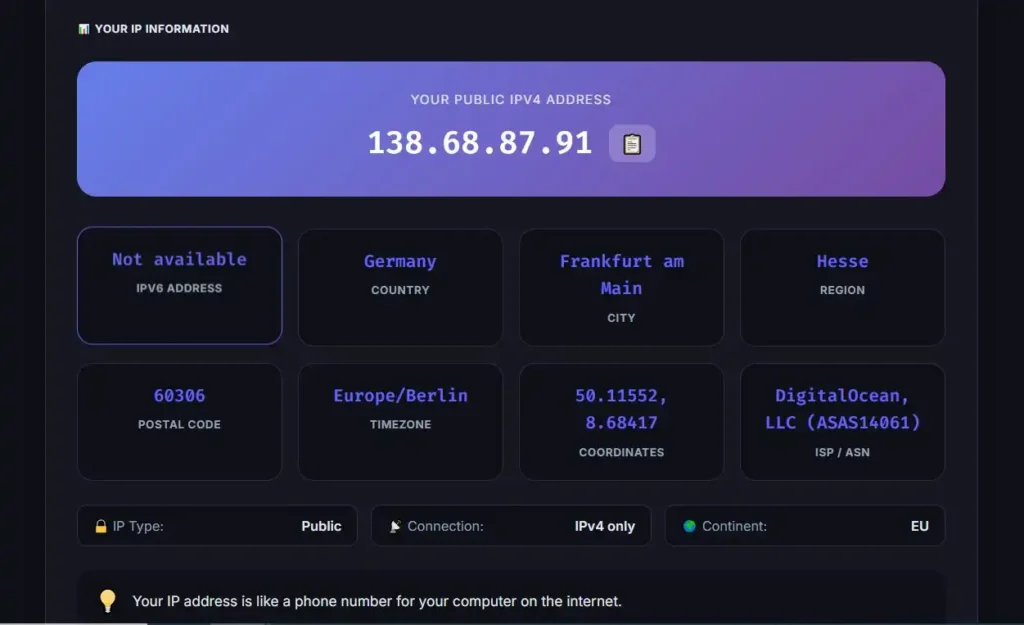
This distinction matters because the IP address displayed by an online IP-checking service may not be the same address you see in your computer's local network settings.
You can check your current public IP address with MiniToolsPro if you want to see the address your internet connection presents externally.
How Are IPv6 Addresses Assigned?
IPv6 follows a different addressing model from IPv4, although the overall allocation hierarchy still involves regional Internet registries and network operators.
IPv6 was designed with a much larger address space and includes mechanisms for address autoconfiguration. IPv6 addresses are 128 bits long, compared with 32-bit IPv4 addresses.
Depending on the network, IPv6 configuration can involve mechanisms such as SLAAC (Stateless Address Autoconfiguration) and DHCPv6.
This means an IPv6-enabled device may be able to configure an address using information advertised by the local router rather than relying on the same IPv4 DHCP process used on many networks.
The important point is that IPv6 address assignment is not simply “IPv4 with longer numbers.” IPv6 has its own addressing and configuration mechanisms.
For a broader comparison, see IPv4 vs. IPv6: what's the difference?.
Why Can Two People Have Different IP Addresses With the Same ISP?
An ISP can manage large pools of addresses and assign different addresses to different customer connections.
For example:
- Customer A →
203.0.113.25 - Customer B →
203.0.113.26 - Customer C →
203.0.113.27
The addresses shown here are illustrative.
ISPs may organize their address space into different pools according to network technology, geographic area, service type, infrastructure, or other operational requirements.
ARIN's documentation shows that ISP address requests can include information about dynamic address pools, service types, regions, customer counts, and statically assigned customer addresses.
The exact allocation strategy is provider-specific, so it is not possible to infer an ISP's complete assignment process simply from a customer's IP address.
Does Your IP Address Identify You Personally?
An IP address should not be treated as a unique personal identifier by itself.
An IP address can be associated with a network connection, ISP, organization, or approximate geographic information, but identifying a particular person generally requires additional information and appropriate records.
Likewise, IP-based location is an estimate rather than a guaranteed physical location.
For more context about what an IP address can reveal, see What Does Your IP Address Reveal About You?.
Frequently Asked Questions
How are IP addresses assigned by ISPs?
ISPs receive or obtain blocks of IP address space and manage those addresses for their networks and customers. Customer connections may receive addresses dynamically or through static assignments, depending on the service and network configuration.
Does DHCP assign my public IP address?
DHCP is a protocol for allocating network addresses and configuration information, but the exact way an ISP manages a customer's public-facing address depends on the ISP's network architecture. DHCP is also widely used inside local networks to assign private IP addresses.
Does my IP address change every time I reconnect?
Not necessarily. A dynamically assigned IP address can remain the same across reconnects if the network's address-management system makes the same address available to the customer again.
Why does my router show a different IP from an IP-checking website?
Your router may show its private local-network address, while an IP-checking website generally sees the public-facing address associated with your internet connection. NAT can sit between the two.
Can I choose my own public IP address?
Normally, you cannot simply choose any public IP address you want. Public addresses must be valid for the network and routing system, and your ISP controls the assignment of addresses associated with its customer connections.
The Simple Way to Think About IP Assignment
The easiest way to understand the process is to separate Internet-level addressing from local-network addressing.
Your ISP manages the connection to its network and can assign or provide a public IP address according to its service and network configuration. Your router then manages the local network and commonly uses DHCP to assign private IP addresses to your devices.
So the simplified chain is:
Internet number resources → ISP → public-facing connection → router → private device addresses
That is why the IP address shown by an online IP-checking tool can differ from the IP address shown in your device's network settings.
If you want to see the public IP address currently visible from your connection, you can use MiniToolsPro's What Is My IP Address tool.
Share this article 👇
0 Comments