
Table of Contents
What Is a Proxy Server and How Does It Affect Your IP?
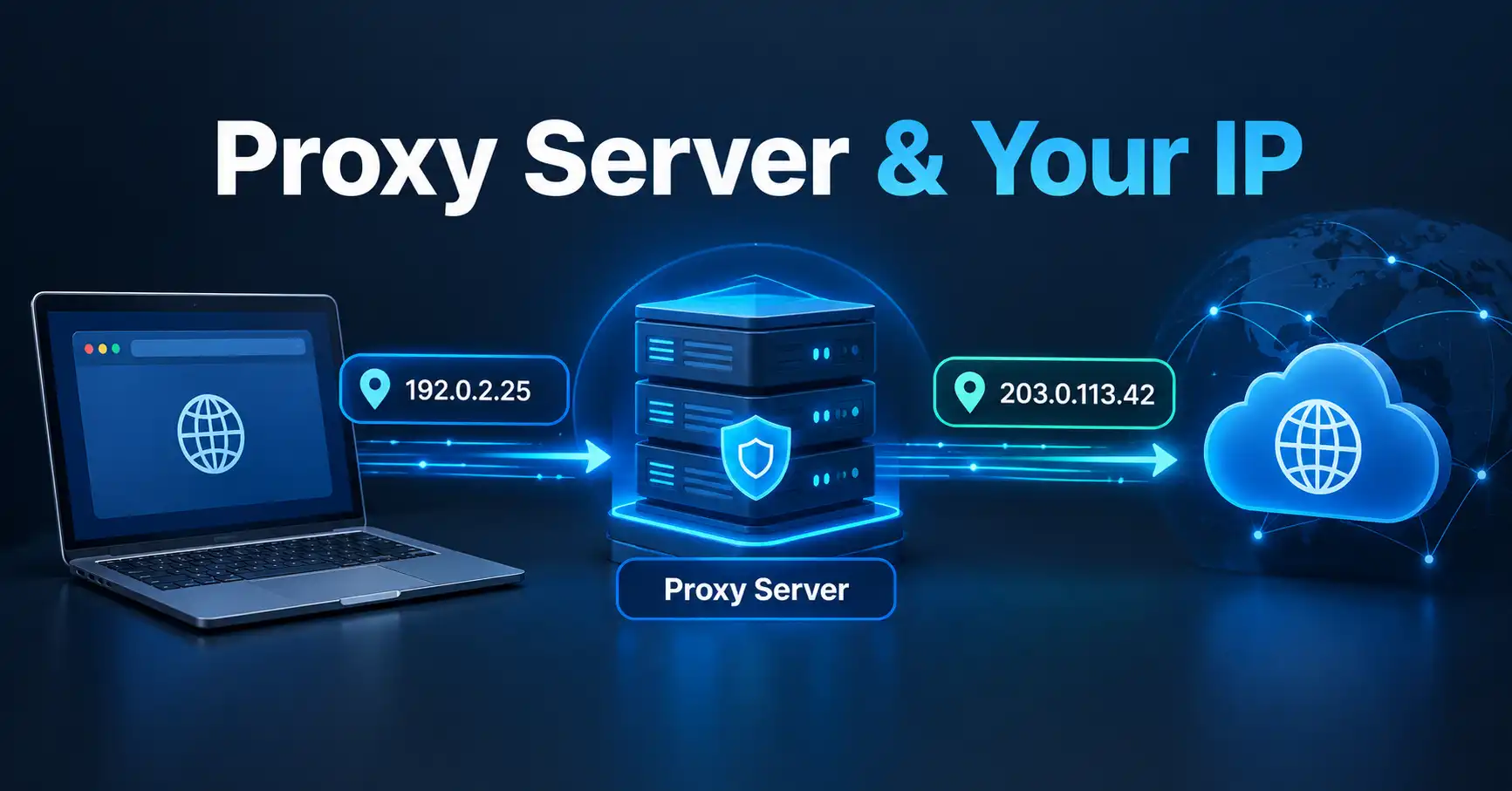
A proxy server is an intermediary between your device and the internet. Instead of connecting directly to a website, your request can pass through the proxy first, which means the destination server may see the proxy's IP address rather than your original client IP address. The exact behavior depends on the type of proxy and how it is configured.
For anyone trying to understand their IP address, a proxy is important because it can change which IP address a website or online service sees.
What Is a Proxy Server?
A proxy server is a system that sits between a client and another server and forwards traffic between them.
Without a proxy, the basic path looks like this:
Your device → Website
With a forward proxy, the path becomes:
Your device → Proxy server → Website
The proxy receives the request from your device and communicates with the destination on your behalf. HTTP standards also define proxy-related mechanisms such as CONNECT, which can establish a tunnel through a proxy for supported traffic.
This intermediary role can be useful for organizations, networks, applications, privacy tools, filtering systems, and other purposes. A proxy is not automatically a security or anonymity solution, however. What it hides, changes, or forwards depends on its configuration.
How Does a Proxy Server Affect Your IP Address?
The most important effect is that a website may see the proxy server's IP address instead of your direct client IP address.
For example, imagine your internet connection uses a public IP such as:
198.51.100.25
You connect to a website through a proxy:
Your device → Proxy → Website
The website may receive the connection from the proxy and therefore see the proxy's IP rather than the original connection's IP.
MDN notes that when a connection passes through forward or reverse proxies, the destination server may see the final proxy's IP. In some configurations, additional HTTP headers can communicate information about the original client IP.
That distinction matters: using a proxy does not necessarily mean your original IP information disappears everywhere.
What IP Address Does a Website See When You Use a Proxy?
In a straightforward proxy arrangement, the destination website sees the IP address associated with the proxy connection.
However, there is no universal rule that every proxy completely hides the original IP.
A proxy can be configured to pass information about the originating client. HTTP headers such as Forwarded and X-Forwarded-For are commonly used by proxy infrastructure to communicate information about the client-facing connection.
This is why it is better to think of a proxy as an intermediary rather than simply an “IP hiding tool.”
The important question is not only:
“Does a proxy change my IP?”
It is also:
“What information does this particular proxy forward to the destination?”
Does a Proxy Server Change Your Real IP Address?
Usually, a proxy does not change the IP address assigned to your internet connection by your ISP.
Instead, it changes the path your traffic takes.
Your ISP-assigned public IP can remain associated with your internet connection, while websites you access through a proxy may see the proxy's IP address.
This is an important distinction between:
- Your underlying public IP: associated with your internet connection.
- The proxy's IP: associated with the intermediary handling the connection.
- The IP visible to a destination: potentially the proxy's IP, depending on the connection and configuration.
So, if you stop using the proxy and connect directly, a website may see a different IP because the proxy is no longer in the connection path.
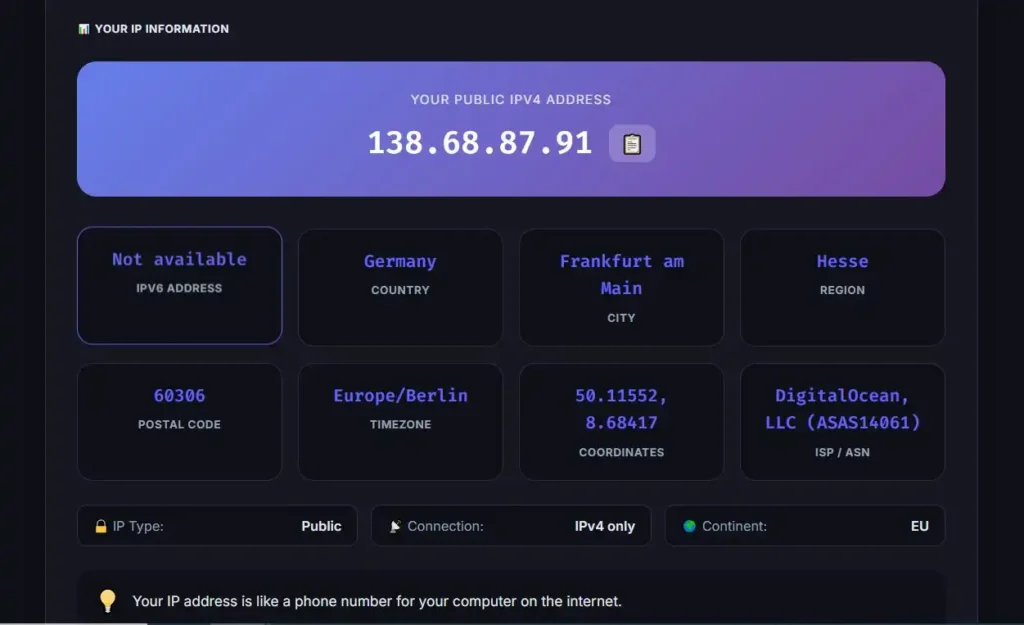
If you want to understand the public IP currently visible from your connection, you can use MiniToolsPro's What Is My IP Address tool.
Why Would Someone Use a Proxy Server?
Proxy servers can serve several different purposes.
Privacy and IP masking
A proxy can make the proxy server's IP appear to the destination instead of the direct client connection in configurations that do not disclose the original IP.
That can reduce direct exposure of the client's IP to the destination, but it should not be interpreted as guaranteed anonymity.
Network filtering
Organizations and networks can use proxies to control or inspect web traffic according to their policies.
For example, a business network may route certain web requests through a proxy before they reach external websites.
Access control
A proxy can sit between users and external services, allowing administrators to control which destinations are reachable from a network.
Caching
Some proxy systems can cache frequently requested resources. This can reduce repeated requests to an origin server in suitable environments.
Application-specific routing
Some applications can be configured to send their traffic through a proxy rather than routing all device traffic through the intermediary.
The exact behavior depends on the application, operating system, proxy type, and configuration.
Proxy Server vs Direct Internet Connection
The difference is easier to understand when the two paths are placed side by side.
| Connection | Basic path | Destination may see |
|---|---|---|
| Direct connection | Device → Website | Client connection IP |
| Proxy connection | Device → Proxy → Website | Proxy IP, depending on configuration |
| Proxy with forwarded client information | Device → Proxy → Website | Proxy IP plus potentially forwarded client IP information |
A proxy therefore changes the connection path rather than magically replacing the IP address assigned to your internet connection.
Does a Proxy Make You Anonymous?
No. A proxy should not be treated as a guarantee of anonymity.
Even when a website does not receive your direct IP address, other information may still identify or distinguish your connection.
Depending on the service and configuration, websites can use information such as:
- Account information
- Cookies
- Browser characteristics
- Login sessions
- Device information
- Request headers
- Other identifiers available to the website
A proxy can also be configured to forward information about the originating client.
For that reason, changing the visible IP is not the same thing as becoming anonymous online.
Proxy Server vs VPN: Are They the Same?
A proxy and a VPN can both place an intermediary between your device and an internet destination, but they are not automatically the same technology or provide identical coverage.
A proxy is commonly configured for a particular application or type of traffic. A VPN can establish a broader encrypted tunnel between a device or network and a VPN endpoint.
The distinction depends on the particular implementation.
| Feature | Proxy | VPN |
|---|---|---|
| Acts as an intermediary | Yes | Yes |
| Can change the IP seen by a destination | Often | Often |
| Automatically provides anonymity | No | No |
| Automatically encrypts all device traffic | No | Depends on VPN configuration |
| Can be application-specific | Yes | Usually broader, depending on setup |
| Can forward original client information | Depending on configuration | Depends on implementation and service |
The key point is that neither a proxy nor a VPN should be described as a universal anonymity guarantee.
Can a Proxy Hide Your IP From a Website?
A proxy can hide your direct client IP from a website when the connection is configured so that the website receives the proxy's connection information instead.
However, the proxy itself can potentially know information about the connection, and the proxy may forward client information to the destination.
Modern HTTP proxying can also involve more advanced tunneling mechanisms. For example, the IETF defines standardized ways to proxy IP and UDP traffic over HTTP, demonstrating that “proxy” can describe several different networking mechanisms rather than one single technology.
Therefore, if privacy matters, you should evaluate the specific proxy service and its configuration, rather than assuming that every proxy works identically.
Can a Proxy Change Your IP Location?
A proxy can affect the location associated with the IP address that a website observes.
For example, if a website sees an IP address belonging to a proxy located in another country, its IP-based location system may associate the connection with that proxy's country or region.
But IP geolocation is an estimate, not a precise physical-location system.
An IP address does not inherently reveal your exact home address, GPS coordinates, or exact physical position.
If you want to understand why an IP-based location may differ from your actual location, the MiniToolsPro cluster also covers why an IP address can show the wrong location.
What Are the Main Limitations of a Proxy?
A proxy can be useful, but several limitations are worth remembering.
The proxy provider can matter
When your traffic passes through an intermediary, you are placing trust in that intermediary. Its logging, security, configuration, and policies can affect your privacy.
Not every application uses the proxy
A proxy configured for one browser or application does not necessarily route every connection from your device through the same intermediary.
The original IP may be forwarded
Some proxy configurations use headers or other mechanisms to communicate information about the originating client.
IP masking is not identity masking
A website can recognize an account, cookie, browser session, or other identifier even when the visible IP changes.
Free proxies require caution
A free proxy is not automatically trustworthy simply because it changes the IP address visible to a destination. Users should consider who operates the service and what information the intermediary may handle.
How Can You Check Your Current IP Address?
If you are experimenting with a proxy, one practical way to understand its effect is to compare the IP address visible before and after enabling the proxy.
You can:
- Check your current public IP address without the proxy.
- Enable and configure the proxy.
- Check the public IP address again.
- Compare the results.
- Remember that the result only shows what the particular connection and tool expose at that time.
MiniToolsPro's What Is My IP Address tool can be used to check your current public IP address.
For a broader explanation of public and private addressing, see the complete guide to what an IP address is.
Common Misunderstandings About Proxy Servers
“A proxy permanently changes my IP.”
Not necessarily. A proxy changes the route used for the connection. Your underlying ISP-assigned IP can remain unchanged.
“A proxy makes me completely anonymous.”
No. A proxy can change what IP a destination sees, but it does not automatically remove other identifying information.
“Every proxy hides my original IP.”
No. Proxy configurations can forward information about the originating client.
“A proxy and VPN are the same.”
No. They can overlap in some purposes, but they are different technologies and can operate at different scopes.
Frequently Asked Questions
What is a proxy server in simple terms?
A proxy server is an intermediary that receives network requests from a client and forwards them toward another server. Instead of communicating directly with the destination, the client communicates through the proxy.
Does a proxy hide my IP address?
A proxy can cause a website to see the proxy's IP instead of the client's direct IP, depending on the proxy configuration. Some proxy systems can also forward information about the original client.
Does a proxy change my ISP-assigned IP address?
No. Using a proxy normally does not change the IP address assigned to your internet connection by your ISP. It changes the route used to reach the destination.
Is a proxy safer than a direct connection?
A proxy is not automatically safer. Its security and privacy characteristics depend on the proxy, its operator, its configuration, and the traffic being handled.
Can I check which IP a website sees?
You can check the public IP associated with your current connection using an IP-checking tool. To compare proxy behavior, check the address before and after configuring the proxy, while remembering that different applications can use different network paths.
Final Takeaway
A proxy server acts as an intermediary between your device and an internet destination. When configured appropriately, it can make the destination see the proxy's IP address instead of your direct client IP.
That does not mean your underlying IP has been permanently changed or that you are automatically anonymous. Proxy configurations can forward information about the original client, and websites can use other information to recognize a connection.
The simplest way to think about a proxy is this:
Your IP connection remains yours, but the traffic can reach the destination through another server.
If you want to see the public IP currently associated with your connection, check it with MiniToolsPro's What Is My IP Address tool.
Share this article 👇
0 Comments