
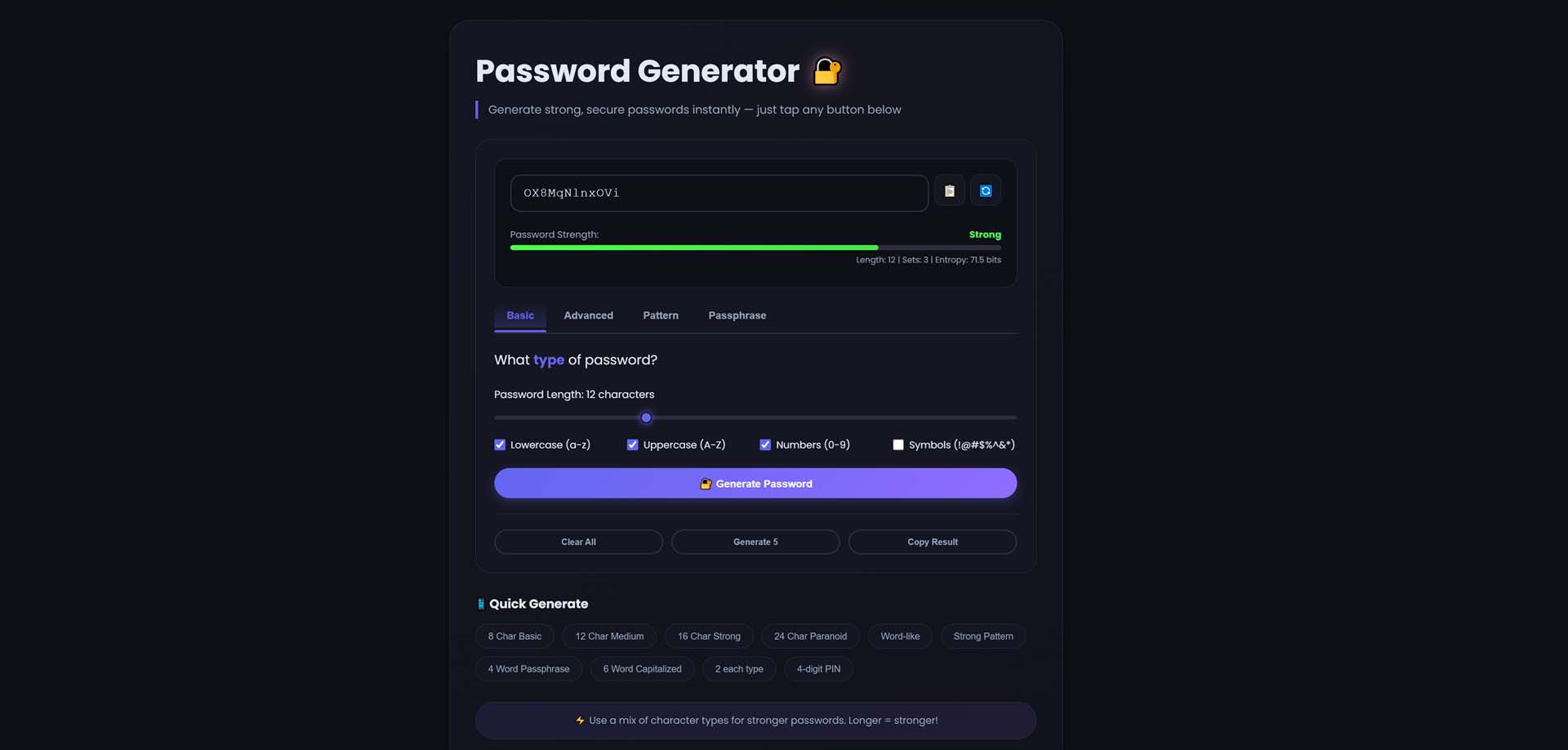
Introduction: Why You Need a Password Generator 🔗
In today's digital world, your password is the key to your entire online life—your email, bank accounts, social media, and private data. Yet, despite the constant warnings about cyber threats, weak passwords remain the number one cause of data breaches.
Did you know that 81% of data breaches are caused by weak or stolen passwords? Shockingly, the most common password of 2023 was still "123456," which takes a hacker less than one second to crack. In fact, a password with fewer than 8 characters can be cracked in under 2 hours.
Enter the password generator—your essential tool for creating fortress-like credentials that keep hackers at bay.
What is a Password Generator? 🔗
A password generator is a software tool that automatically creates strong, random, and unique passwords for your online accounts. It uses complex algorithms to combine letters, numbers, and symbols in unpredictable ways, ensuring each password is virtually impossible to guess or crack.
Key Characteristics of a Strong Password 🔗
1. Length 🔗
- The longer, the stronger
- Aim for 12-16 characters minimum
- Each additional character exponentially increases security
2. Complexity 🔗
- Uses a mix of character types:
- Uppercase letters (A-Z) - Lowercase letters (a-z) - Numbers (0-9) - Special symbols (!@#$%^&*)
3. Unpredictability 🔗
- No dictionary words
- No personal information (birthdays, names)
- No common patterns (qwerty, 123456)
4. Uniqueness 🔗
- Never reuse passwords across accounts
- Each account gets its own unique credential
Why Your Online Security Needs a Password Generator 🔗
🔒 1. Protection Against Brute Force Attacks 🔗
Hackers use automated tools that try millions of password combinations per second. A random password generator creates passwords with such high entropy that these attacks become computationally impossible.
🛡️ 2. Defense Against Dictionary Attacks 🔗
Cybercriminals use databases containing billions of common words, phrases, and leaked passwords. Our secure password generator avoids dictionary words entirely, making these attacks useless.
🚫 3. Eliminates Password Reuse 🔗
Most people use the same password across multiple sites. When one site gets breached, all accounts become vulnerable. A password creator ensures every account has a unique, unrelated password.
🧠 4. Removes Human Predictability 🔗
Humans are terrible at randomness. We subconsciously favor certain letters and patterns. A random password generator creates true randomness that no human could replicate.
📱 5. Future-Proof Security 🔗
As computing power grows, passwords need to keep pace. Our online password generator allows you to create passwords with adjustable complexity, ensuring you can always stay ahead of emerging threats.
How to Generate Strong Passwords: Step-by-Step Guide 🔗
Method 1: Using Our Free Online Password Generator 🔗
Our free online password generator makes creating unbreakable passwords simple:
Step 1: Access the Tool 🔗
Visit our Password Generator Tool - it's completely free, no registration or personal data required.
Step 2: Configure Your Password Settings 🔗
Customize your password parameters:
- Password Length: Select between 8-32 characters
- Recommended: 16 characters for maximum security
- Include Uppercase Letters: (A-Z)
- Adds complexity and randomness
- Include Lowercase Letters: (a-z)
- Essential for password diversity
- Include Numbers: (0-9)
- Prevents dictionary-based attacks
- Include Symbols: (!@#$%^&*)
- Critical for maximum security
Step 3: Choose Generation Options 🔗
- Avoid Ambiguous Characters: Exclude similar-looking characters (e.g., 0/O, 1/l/I)
- Start with Letter: For sites with specific requirements
- End with Symbol: Adds an extra layer of complexity
Step 4: Generate Your Password 🔗
Click "Generate Password" to instantly create a secure, random password.
Step 5: Copy and Store Securely 🔗
- Copy to clipboard with one click
- Store in a password manager (never in plain text)
- Regenerate as many times as needed
Method 2: Understanding Password Strength 🔗
To understand why password generators are essential, let's look at the math:
| Password Type | Example | Time to Crack | Security Level | |---------------|---------|---------------|----------------| | Simple (6 chars, lowercase only) | "secret" | < 1 second | Very Weak | | Common (8 chars, dictionary word) | "password" | < 1 minute | Weak | | Moderate (8 chars, mixed) | "P@ssw0rd!" | 2-3 hours | Moderate | | Strong (12 chars, all types) | "kL9#mQ2$pR5!" | 200+ years | Strong | | Very Strong (16 chars, all types) | "xR7#mK3$pL9@nQ5!" | 100,000+ years | Unbreakable |
Best Practices for Password Management 🔗
✅ 1. Use a Password Manager 🔗
Password managers like Bitwarden, 1Password, or LastPass:
- Securely store all your generated passwords
- Auto-fill credentials on websites
- Sync across all your devices
- Alert you to compromised accounts
✅ 2. Enable Two-Factor Authentication (2FA) 🔗
Even with a strong password, 2FA adds an extra layer:
- SMS verification
- Authenticator apps (Google Authenticator, Authy)
- Hardware keys (YubiKey)
✅ 3. Never Share Passwords 🔗
- No password sharing via email or text
- Use secure sharing features in password managers
- Create guest accounts when needed
✅ 4. Regular Security Audits 🔗
- Review saved passwords monthly
- Check for compromised accounts using services like Have I Been Pwned
- Update passwords after any security breach notification
✅ 5. Avoid Common Password Pitfalls 🔗
Don't use:- Personal information (names, birthdays)
- Common patterns (qwerty, 123456)
- Single dictionary words
- The same password across multiple sites
Password Generator vs. Password Manager: What's the Difference? 🔗
| Feature | Password Generator | Password Manager | |---------|-------------------|------------------| | Primary Function | Creates strong passwords | Stores and manages passwords | | Storage | No storage | Encrypted vault | | Auto-fill | No | Yes | | Sync Across Devices | No | Yes | | Breach Alerts | No | Yes | | Best Use Case | One-time password creation | Daily password management |
Pro Tip: Use both! A password generator creates the strong passwords, and a password manager stores them securely.Frequently Asked Questions 🔗
Is it safe to use an online password generator? 🔗
Yes, when used correctly. Our password generator works entirely in your browser—passwords are generated locally and never transmitted to our servers. For maximum security, use tools that are open-source and client-side.
How long should my password be? 🔗
Security experts recommend at least 12 characters, but 16 characters is the gold standard for future-proof security.
Can I remember a strong password? 🔗
For master passwords (like your password manager), use a passphrase—a string of random words that are easy to remember but hard to crack. Example: "correct-horse-battery-staple" (though use words unique to you).
How often should I change my passwords? 🔗
Change passwords:
- Immediately after a known breach
- Every 6-12 months for critical accounts
- When you suspect unauthorized access
Conclusion: Take Control of Your Digital Security 🔗
Your online security is only as strong as your weakest password. In an age where cyber threats are constantly evolving, relying on memorable, reused passwords is no longer an option.
A password generator is the simplest, most effective tool you can use to instantly upgrade your security posture. By creating long, complex, and truly random passwords for every account, you build a digital fortress that keeps your personal information safe from attackers.
Start protecting your digital life today: Use our free password generator to create unbreakable passwords for your most important accounts, pair them with a trusted password manager, and enable two-factor authentication wherever possible.Your future self—and your online identity—will thank you.
---
Ready to strengthen your security? Generate your first secure password now →