
Table of Contents
Can Someone Hack or Track You With Just Your IP Address?
Yes, someone can potentially use your public IP address to learn information about your internet connection or probe internet-facing services, but an IP address alone does not normally give an attacker direct access to your device. The real risk depends on what services are exposed, how the network is configured, and whether the device or router has security vulnerabilities.
That distinction matters because an IP address is often treated as if it were a password or a complete digital identity. It is neither.
What Can Someone Do With Your IP Address?
A public IP address is visible to websites and internet services you connect to. It can also be used by security tools and other parties to identify the network from which traffic originates.
Depending on the circumstances, someone who knows your public IP address may be able to:
- Identify your ISP or network provider.
- Estimate your general geographic area.
- Check whether certain internet-facing ports or services respond.
- Attempt to connect to exposed services.
- Use the address as one piece of information when investigating online activity.
- Combine the IP address with other information gathered elsewhere.
An IP address is therefore useful information to an attacker, but it is not normally sufficient by itself to take over a properly secured computer.
The IETF notes that IP-based geolocation is a heuristic and can have varying levels of accuracy. An IP address should not be treated as a precise GPS coordinate or exact home address.
Can Someone Hack You With Your IP Address?
An attacker generally cannot hack a properly secured device simply because they know its IP address.
Knowing an IP address can, however, give an attacker a destination to investigate.
For example, an attacker might scan an address for internet-accessible services. If the network exposes a vulnerable router administration interface, remote-access service, outdated application, or another poorly secured service, the attacker may attempt to exploit that weakness.
This is why the important question is not:
“Does someone know my IP address?”
It is:
“What is reachable from the internet at that IP address, and is it properly secured?”
CISA's guidance on reducing internet exposure specifically highlights publicly accessible systems, outdated software, default credentials, and misconfigured services as factors that can increase exposure to exploitation.
An IP address is not a password
Knowing an IP address does not normally provide:
- Your computer password
- Your email password
- Your banking credentials
- Your Wi-Fi password
- Automatic access to your files
- Automatic control of your computer
An IP address identifies a network endpoint. Authentication credentials and software vulnerabilities are separate security issues.
What Does an Attacker Need to Actually Compromise a Device?
An attacker usually needs more than an IP address.
The exact requirements depend on the attack, but additional factors might include:
- An exploitable vulnerability
- An exposed network service
- Weak or default credentials
- Poor router configuration
- Malware already installed on a device
- A successful phishing attack
- Stolen account credentials
- An insecure remote-access service
For example, suppose someone discovers your public IP address and finds that a vulnerable service is accessible from the internet. The vulnerability could provide an avenue for attack.
If that service is patched, properly configured, protected by authentication, and not unnecessarily exposed, simply knowing the IP address does not give the attacker the same opportunity.
The Federal Trade Commission recommends keeping software and operating systems updated and securing the home router because outdated software and poorly secured network equipment can create opportunities for attackers.
Can Someone Track You With Your IP Address?
An IP address can be used for network-level tracking and approximate location, but it usually cannot reveal your exact physical location by itself.
An IP lookup may associate an address with information such as:
- Country
- Region or state/province
- Approximate city
- ISP or network operator
- Organization or network
The accuracy varies considerably.
The IETF describes IP-based geolocation as an estimation technique rather than a precise location mechanism. Network architecture, VPNs, tunnels, NAT, mobile networks, and other factors can affect what location an IP appears to represent.
So if an IP lookup says an address is in a particular city, that does not necessarily mean the person using the connection is physically sitting at that exact location.
Does an IP address reveal your home address?
Usually, no.
An IP address can sometimes provide an approximate geographic association, but it does not inherently contain your street address or GPS coordinates.
Additional information held by an ISP or another service may potentially connect network activity with a subscriber, but that is different from someone simply looking at an IP address and immediately obtaining a home address.
What About Your Private IP Address?
Your home network normally has a different internal addressing structure from the public internet.
For example, a router might assign devices private IPv4 addresses such as:
192.168.1.20192.168.1.3510.0.0.15
These addresses are intended for internal networks and are not globally routable on the public internet.
Network Address Translation (NAT) commonly allows multiple devices on a local network to communicate through a public-facing address. The IETF documents how NAT can make multiple internal devices appear externally through one public IPv4 address.
This means someone on the internet generally sees the network's public-facing address rather than directly seeing every device's private address.
For a deeper explanation, see our guide to Public vs Private IP Address: What's the Difference?.
What If Someone Has Already Found Your IP?
Finding your IP address does not automatically mean you have been hacked.
If you are concerned, focus on reducing unnecessary exposure rather than trying to hide the number at all costs.
1. Keep your router updated
Check whether your router has current firmware and security updates. Router vulnerabilities can matter because the router sits between your local network and the internet.
The FTC recommends changing default router settings and checking for available updates.
2. Remove unnecessary internet-facing services
If you have enabled remote administration, game servers, cameras, remote desktop, or other services that must be reachable from outside your network, make sure they are intentionally configured and secured.
Do not expose a service simply because an application suggests opening a port.
3. Replace default credentials
Never rely on default router administrator credentials if they have not been changed.
Use strong, unique credentials and enable additional authentication where the device supports it.
4. Keep computers and phones updated
Security vulnerabilities are regularly discovered in operating systems, browsers, applications, and network equipment.
Installing available security updates reduces exposure to known vulnerabilities.
5. Be careful with phishing and malware
Changing your IP address will not protect an account if an attacker already has your password.
Phishing, malicious downloads, stolen credentials, and malware can provide attackers with access that has nothing to do with discovering your IP address.
The FTC specifically recommends avoiding unexpected links and attachments and using strong passwords and two-factor authentication for important accounts.
Does a VPN Stop Someone From Seeing Your IP?
A VPN can change which public IP address a website or internet service sees by routing traffic through the VPN provider.
That can make the destination service see the VPN server's address instead of your normal public IP address.
However, a VPN is not the same thing as complete anonymity.
A VPN does not automatically:
- Make you invisible online
- Protect compromised accounts
- Remove browser or device fingerprints
- Prevent phishing
- Fix malware
- Make an insecure router secure
- Guarantee that every service cannot identify you
The privacy benefit depends on what information the VPN provider and other services can observe, as well as how the rest of your online activity is configured.
Should You Be Worried If Someone Knows Your IP?
Not necessarily.
Websites, online services, and network operators routinely see IP addresses as part of normal internet communication. Having your IP address exposed is not, by itself, evidence that someone has compromised your device.
Take the situation more seriously if you also notice signs such as:
- Unexpected router settings changes
- Unknown administrator accounts
- Unfamiliar remote-access services
- Repeated security alerts
- Unusual device behavior
- Unknown software installations
- Account login notifications you do not recognize
In that situation, investigate the device and network rather than focusing exclusively on the IP address.
If you are unsure what your current public IP address is, you can check your public IP address with MiniToolsPro. Knowing the address can help you understand what information is publicly associated with your current internet connection.
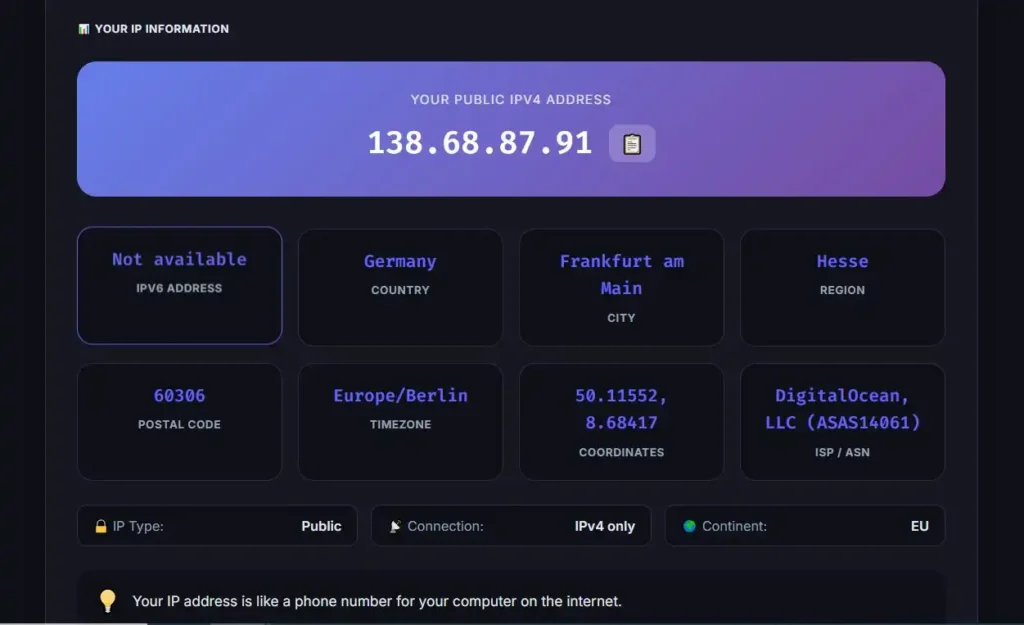
For broader background, our complete guide to IP addresses explains public and private addresses, IPv4 and IPv6, geolocation, and other common IP-related questions.
The Bottom Line
Someone knowing your IP address does not automatically mean they can hack your computer.
An IP address can reveal or help determine information about your network and approximate location, and it can give an attacker a destination to investigate. The bigger security concern is whether vulnerable or poorly configured services are exposed behind that address.
Keep your router and devices updated, remove unnecessary internet-facing services, use strong credentials, and protect important accounts with multi-factor authentication.
An IP address is part of your internet connection's public footprint. It is worth understanding, but there is no need to treat the number itself as if it were a complete key to your device.
FAQ
Can someone hack me if they know my IP address?
Knowing your IP address alone does not normally give someone control of your device. An attacker would generally need an additional weakness, such as an exposed vulnerable service, compromised credentials, malware, or a security misconfiguration.
Can someone find my exact location from my IP address?
Usually not. IP geolocation can estimate a country, region, city, ISP, or organization, but it is not inherently a precise GPS or street-address lookup. Accuracy varies by network and geolocation database.
Can someone find my name from my IP address?
An IP address by itself does not normally contain your name. Connecting an IP address to a particular subscriber may require additional information held by an ISP or another service.
Should I change my IP address if someone knows it?
Not necessarily. If there is no sign of compromise, knowing your IP address is not by itself a reason to panic. Improving router security, updating devices, removing unnecessary exposed services, and securing accounts are generally more important.
Does a VPN hide my IP address?
A VPN can make websites and other destination services see the VPN server's public IP address instead of your normal public IP address. It does not guarantee complete anonymity or protect against every type of online attack.
Share this article 👇
0 Comments